Sometimes, we want to shuffle the location hierarchy a little bit as part of the initial site setup or as an on-going data maintenance activity.
Once the location hierarchy is setup, it is not possible to move a location to a new parent. We can only do it using MXLoader or SQL Update. I’ve done this a few times using different approaches. But I have never noted it down and thus, always struggle a bit when I had to do it again. This time, I make sure I document the steps that I did:
Method 1 – Easier
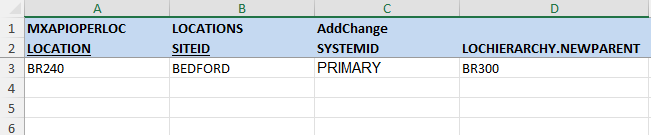
The LOCHIERARCHY object has a NEWPARENT non-persistent attribute which allows us to move a location to a new parent. Out-of-the-box, the MXAPIOPERLOC object structure has this field included by default. Thus, we can use MXLOADER to move a location to a new parent using a simple structure as shown in the example template below:
Method 2 – Faster with high volume of data
First, use MXLOADER to create two locations TOILET1 and TOILET2 with no parent:

Since they have no parent, we can use MXLOADER to move them to a parent with the use of the non-persistents PARENT and SYSTEMID:

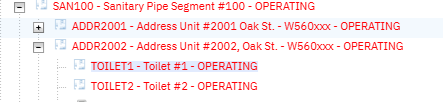
After updated, the two items are shown in the hierarchy:
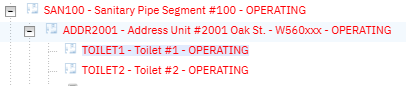
Now, let’s say that’s not correct. We want to move them to ADDR2002 instead. Updating the PARENT, then reloading the data doesn’t work. So, first we need to delete all data related to TOILET1 and TOILET2 in the LOCHIERARCHY and LOCANCESTOR table using SQL:
DELETE lochierarchy WHERE location in ('TOILET1', 'TOILET2');
DELETE locancestor  WHERE  location in ('TOILET1', 'TOILET2');
If we have no DB access, there is a hack using automation script to update the DB (use this approach ONLY if you know what you’re doing)
After that, we can use MXLOADER to put the two locations to a new parent again:

Use the Drilldown function to confirm the hierarchy is now looking good: