Problem:
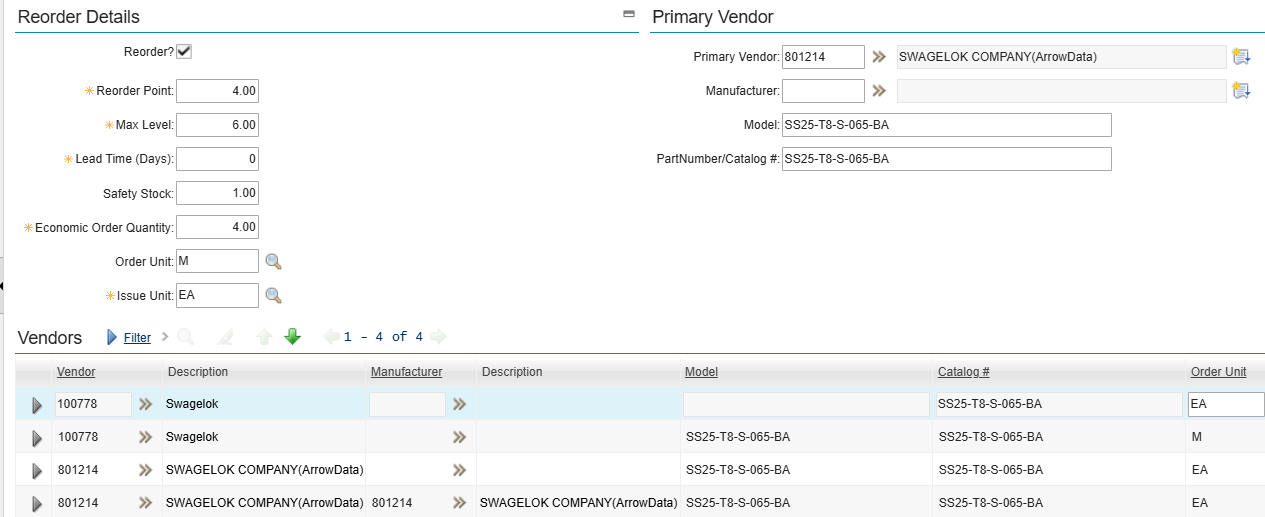
An item was enabled for automatic reordering, and the item had been reserved against work orders. The available balance had clearly fallen below the reorder point; however, the item was not picked up by the automatic reordering process.
As a result, the required stock was not replenished in time, preventing the operator from starting the scheduled work.
Cause:
After further investigation, it was found that the item had a different Order Unit and Issue Unit. In this scenario, Maximo requires a conversion factor to be configured to convert the ordered quantity into the inventory quantity managed in the storeroom.
IBM has an article that describes this issue: Maximo Reorder Will Not Run Without Conversion
Comments:
This is definitely something that will surprise many users. IBM might consider this a “feature”, but from a usability perspective, I would consider it a design issue. The application should provide a clear validation message to inform users when the configuration is incomplete. For example, Maximo could validate the item setup and raise an error, or flag the item as invalid for reordering when no conversion factor is configured.
To identify existing items that may be affected by this issue, I used the query below. As a preventative measure, we could also configure a result set using the same query to allow logistics coordinators to proactively identify and address these issues when they occur.
SELECT iv.itemnum, iv.location, iv.siteid, i.description, iv.orderunit, iv.issueunit, iv.reorder, iv.minlevel, iv.maxlevel
FROM inventory iv
LEFT JOIN item i ON i.itemnum = iv.itemnum AND i.itemsetid = iv.itemsetid
WHERE iv.orderunit != iv.issueunit
AND not exists(SELECT *
				FROM conversion c
				WHERE ((c.frommeasureunit = iv.orderunit AND c.tomeasureunit = iv.issueunit)
						OR (c.frommeasureunit = iv.issueunit AND c.tomeasureunit = iv.orderunit))
						AND (c.itemnum is null OR c.itemnum = iv.itemnum))